
Frequently asked questions
Everything you need to know about Blisterr, from Peeks and Lives to payments and delivery.
Most asked
🎉 Welcome to Blisterr(4)
What is Blisterr?
Blisterr is an immersive marketplace dedicated to pop culture, where enthusiasts and collectors buy and sell unique items via video.How do I create an account?
Signing up is free and instant. Enter your email address, receive a secure login code, and link your phone number.When was Blisterr founded?
Blisterr was founded in 2021 by two passionate fans of TCG, figures, and retro collectibles.What support is available?
Our support team is available during business hours (Monday to Friday) and replies within 48 business hours. Discord and email support@blisterr.com.
🎯 Sales formats(9)
What sales formats are available on Blisterr?
Five formats: instant buy (fixed price), classic auction (open bidding), silent auction (sealed bids), drop (price drops over time, first to click wins) and giveaway (random draw). Each of these can be offered as a Peek (short video) or during a Live (real-time stream).What is the difference between a classic auction and a silent auction?
Classic auction: every bid is visible in real time, you see the current best bid and can outbid. Silent auction: other buyers' bids are hidden: you place your best price without knowing where the others stand. When the countdown ends, the highest bidder wins in both cases.How does the Drop format work?
A Drop is a reverse auction: the seller sets a starting price and a floor price, and the price drops automatically to the floor over the announced duration. The first buyer who taps 'Buy' wins the lot at the price shown at that moment. The longer you wait, the lower the price, but someone may buy before you.How does a giveaway work?
The seller publishes an item in Giveaway mode and picks the audience: everyone, their followers, or their past buyers. Eligible participants enter for free. When the countdown ends, a winner is drawn at random and receives the item. On the seller side, the item is given away: Blisterr applies 0% commission, but the seller covers the shipping cost to the winner.What happens if the seller loses their connection during a Live?
Blisterr automatically keeps the Live recoverable for 10 minutes. After a short outage, the seller resumes almost immediately. If the interruption lasts longer, Blisterr prepares a new broadcast space: the seller waits on the preparation screen, then the broadcast and viewers resume automatically without creating a new event. After 10 minutes, the Live ends and its replay is finalised with the footage that was actually recorded.Which format should I pick as a buyer?
You want the item now with no surprise: instant buy. You are chasing a rare piece with a flexible budget: classic auction. You do not want to reveal your max price: silent auction. You are willing to wait for the right price: drop. You want the social experience and the thrill: live. You want to try your luck: giveaway.Which format should I pick as a seller?
Instant buy for regular stock where the price is known. Classic or silent auction for rare pieces you want the market to price. Drop to clear an item without locking a buyer. Giveaway to grow and engage your community. Live to sell volume in one session and create an event.Are all formats available on web and mobile?
The iOS and Android app covers every format with the most complete experience, especially for Lives and video Peeks. The web lets you buy, bid, and track orders, but immersive video and live features are optimised for mobile.Are the fees the same across formats?
Yes. Blisterr applies 0% seller commission on every format, and the same buyer fees (6.9% + €0.49) apply regardless of format. Only shipping costs vary depending on the shipping mode chosen by the seller.
🛒 Buying on Blisterr(3)
What is a Peek?
A Peek is a short video showcasing a collectible. You swipe to discover, then bid or buy in a single tap without leaving the video.How does a live auction work?
The seller streams live, presents items one by one, and starts the bidding. You bid in real time from mobile or web. The highest bidder wins the lot when the timer ends.Can I cancel a bid?
A bid is binding. It can only be cancelled in exceptional cases (obvious error, technical issue). Contact our support team if needed.
🏪 Selling on Blisterr(4)
How do I become a seller on Blisterr?
Apply through the seller application form. Our team reviews your profile within 48 business hours and helps you set up your shop.How much is the seller commission?
0% commission on sales, no signup fees, no listing fees. The only seller fees are withdrawals (see dedicated question) and the shipping cost on items given away as giveaways.What sales formats can I offer?
Five sales formats: instant buy, classic auction, silent auction, drop, and giveaway. Each can be offered as a Peek (short video) or during a Live (real-time stream).How do I launch a Live?
From + Sell → Create a Live, enter the category and title. You can add items, write a notification and schedule your Live. Preview it, then broadcast through Blisterr or external software. For OBS, follow the settings and screenshots below.Set up OBS for your Blisterr Live
Streaming from your computer with OBS Studio? Connect your scene to Blisterr and limit the delay added by encoding before presenting your items.
Before you start
Prepare your scene and microphone in OBS, then create your Live in the Blisterr seller area. At the broadcasting step, choose streaming software.
1. Connect OBS to your Live
- In OBS, open Settings → Stream.
- Choose WHIP from the Service menu.
- Copy the server address shown for your Blisterr Live into Server, then copy the token into Bearer Token. Click Apply.
The token lets someone broadcast to your Live: keep it private. The screenshot fields are intentionally empty; use the values from your own Live.
Official OBS documentation: WHIP connection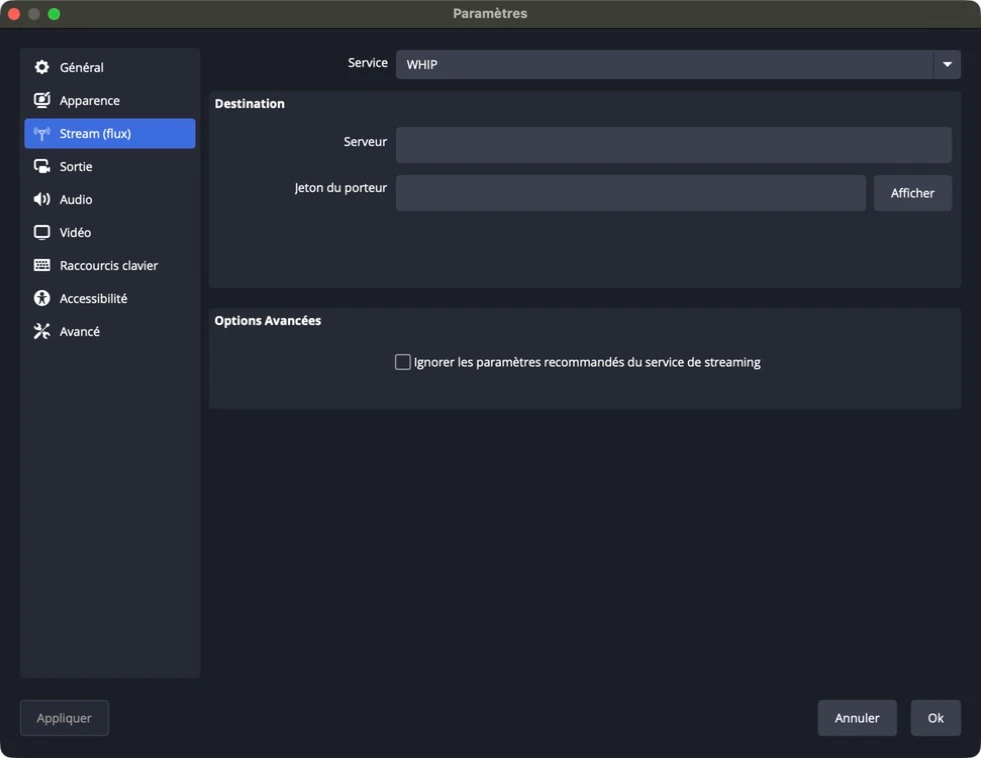 Enlarge image (new tab)
WHIP connection in OBS. No broadcast credentials are shown. 2. Configure video and encoding
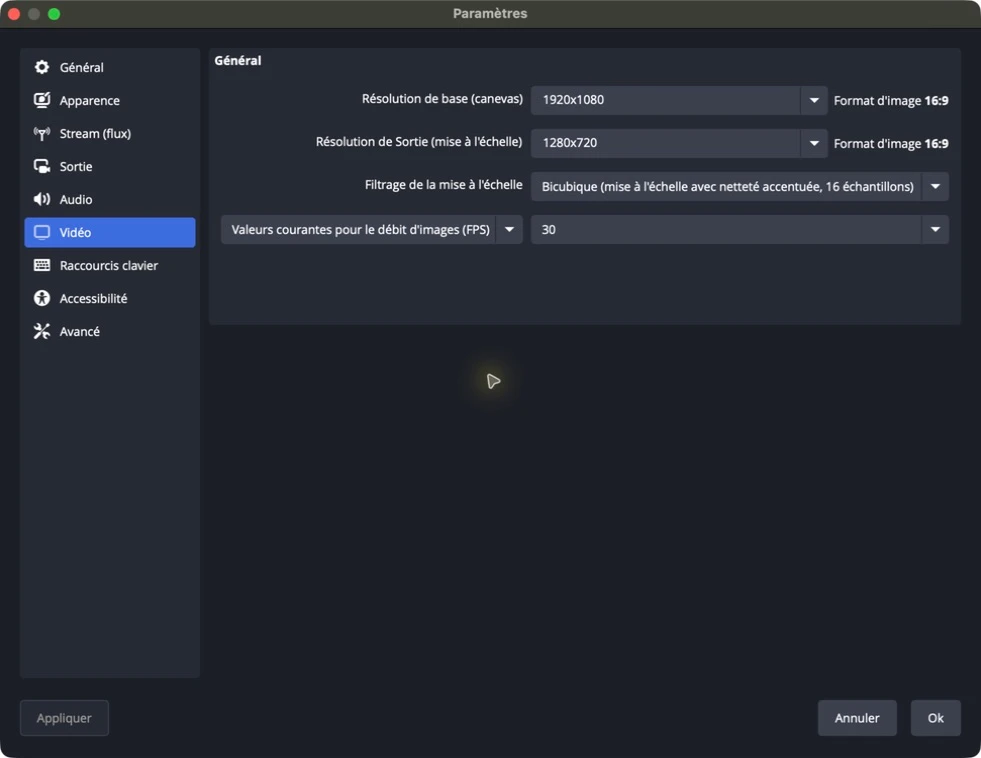
The profile below is a tested starting point at 720p and 30 frames per second. Adjust quality to suit your connection and computer. In Settings → Video, set the output resolution to 1280 × 720 and the frame rate to 30 frames per second. In Output, choose Advanced output mode and open the Streaming tab.
 Enlarge image (new tab)
The stream uses the output resolution: 1280 × 720 here, even though the canvas is 1920 × 1080. Setting Value Video Encoder x264 Rate Control CBR Video Bitrate 2,500 Kbps Keyframe Interval 1 s CPU Usage Preset veryfast Tune zerolatency x264 Options Leave empty Output Resolution 1280 × 720 Frame Rate 30 FPS 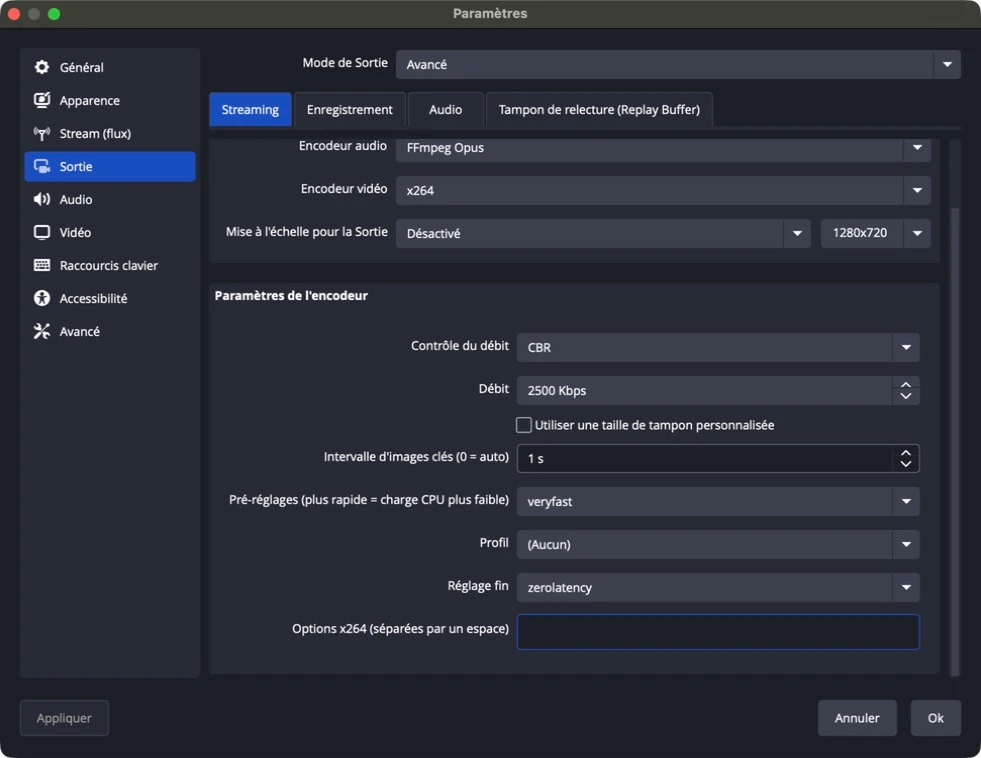 Enlarge image (new tab)
These settings apply to the x264 encoder. Screenshots show OBS in French; labels may vary with your version. 3. Check your stream before selling
- Click Start Streaming in OBS and check that your picture appears in Blisterr.
- In Blisterr, click Launch live to open the broadcast to viewers.
- Open the Live on a second device and check the picture, sound and audio-video synchronisation.
- In OBS, open View → Stats and watch dropped frames, skipped frames and bitrate for several minutes.
- If the picture stutters, check your connection and computer load before starting a sale.
The delay also depends on your connection, computer and viewer playback. The zerolatency setting does not mean that the broadcast arrives instantly.
What about OBS Virtual Camera?
To use your OBS scene with Blisterr camera mode, start the virtual camera in OBS and select OBS Virtual Camera as the camera in Blisterr. Select your microphone in Blisterr as well. The encoder settings above apply to streaming software mode.
💼 Wallet & Payments(5)
Which payment methods do you accept?
Credit cards (Visa, Mastercard, Amex), Apple Pay, Google Pay, and your integrated Blisterr wallet. All payments are end-to-end encrypted.How does the Blisterr wallet work?
The wallet is credited automatically by refunds of cancelled orders and referral credits. It cannot be topped up manually. At checkout, you can pay with your wallet balance, by card, or both combined if your wallet balance is insufficient.Can I withdraw my wallet balance?
Bank withdrawals are only available to sellers (a seller's wallet balance reflects their collected sales). On the buyer side, your wallet balance, credited by refunds and referrals, is used to pay for your next Blisterr orders.What are the seller withdrawal fees?
One free withdrawal every 40 days. Beyond that, 3% of the amount + €1 per operation. Sale funds become available as soon as the buyer confirms reception, or automatically 20 days after the delivery date reported by the carrier.When am I charged after winning an auction?
The charge is automatic as soon as you win. For a live auction, the charge happens at the end of the lot. For a Peek, the charge happens immediately after your tap.
📦 Orders & Shipping(1)
What if my package doesn't arrive?
All shipments are tracked via the chosen carrier (Colissimo, Mondial Relay, Chronopost…). If your package doesn't arrive within the announced timeframe, open a dispute from your order: our buyer protection program takes over.
💬 Messaging & Community(8)
How do I message a shop?
Before buying, tap "Message the shop" from a Peek. During a Live, use the chat. After a purchase, go to "Menu > Orders > Contact the shop".How do I report a problem?
From a Peek, open the menu in the top right. In the messaging or Live, open the menu and select "Report".What happens after a report?
A private ticket is automatically created on the official Blisterr Discord. Our team gets notified instantly and reviews your report.Can the team suspend or remove content?
Yes. They can temporarily suspend an account, remove offending content, or take further moderation action.What is the first safety rule on Blisterr?
Always buy and sell only on the platform. Transactions made outside Blisterr are not secured and don't benefit from any protection.Should I share personal information in messages?
No. Never share personal contact info, banking data, or sensitive information.What behaviors are forbidden on Blisterr?
Violence, threats, harassment, hate speech, spam, scams, manipulation, explicit sexual content, child exploitation.Where can I join the Blisterr community?
Join the Blisterr community to chat with other enthusiasts, follow official announcements, and join our events: discord.com/invite/4suYsG8aQe
🍔 My Account(3)
How do I create an account?
Sign up with your email and an OTP code, no password to manage. Download the Blisterr app to get started.How do I delete my account?
You can request account deletion from your settings. Your account is then deactivated, and your personal data is handled in line with GDPR (with retention only for legally required records: invoices, transaction history, etc.).Can I change my username?
Yes, from your settings. Note that your referral code is tied to your username: it will update automatically if you change it.
💸 Service Fees & Security(3)
Why must a card payment be at least €0.50?
Our payment provider requires a minimum card charge of €0.50. For a giveaway, the seller still covers the cheapest delivery option. If another option leaves only €0.01 to €0.49 to pay by card, choose a different delivery method or use your wallet to cover the whole extra cost. No below-minimum charge or order is created.How are sellers verified?
Every seller is reviewed manually by our team. We verify their identity, history, and the quality of their first listings before granting platform access.Is my payment data secure?
Your payment data is end-to-end encrypted and processed by a PCI-DSS Level 1 certified provider. It never touches our servers.
📞 Contact & Support(3)
Where can I join the Blisterr community?
Discord server: discord.com/invite/4suYsG8aQe. Open a ticket in #ticket for any support request.What is the support email address?
support@blisterr.comWhen is support available?
Blisterr support is available during business hours (Monday to Friday). We reply within 48 business hours.
No results
Try different keywords, or reach out to us directly.